
Photo Collage Free - Get APK
You'll be able to download in few seconds.
Publisher Description
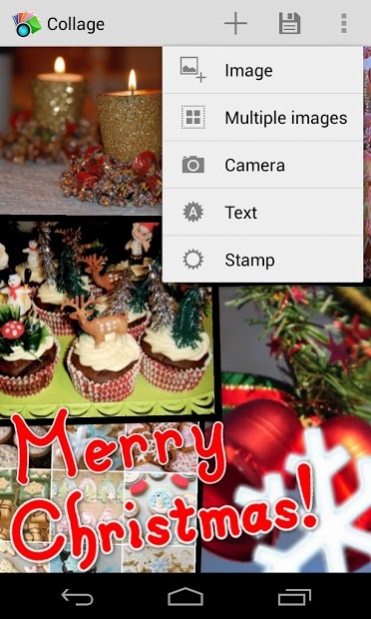
What is Collage? It's a photography app with more than 2.000.000 users in total! Collage makes it easy and fun to arrange images, pictures, photographies and photos on your smartphone or tablet in an instant!. Have fun, and share your photo collages with any social media. Great for any theme greeting cards!
Don't limit your collages to photos! With Collage it's easy to add text or stamps. Stamps are clasiffied by themes so it's easy to find that special image you are searching... Valentine, maybe? Christmas? Summer holidays? Want to sell something? Make a wonderful collage and show how nice your product is!
Collage includes the fantastic Aviary photo editor with new frames, image effects, image coloring, etc...
Main features and reason to use Collage:
- The best and easier to use collage maker.
- Beautiful design, for both phones and tablets!
- Load images from the gallery, camera or any other app.
- Share from other apps, an even easier way of adding multiple photos to Collage!
- Add and edit text to your collage with that special message.
- Decorate your collages with funny stamps. More than 150 to choose from!
- Full image effects with image editor: gouache, drawcam, watercolor, sketch, halftone,
- Nice storytelling collages.
- Colored frames for your pics and photographies.
- Save your collage to work on it later.
- Save the collage in high resolution (more than 1024x1700 in full version). Perfect for desktop or home screen wallpaper!
- Share your collage to any social media.
We are always working to improve Collage. Feel free to mail us asking for features! As example, photo grids will be one of the next new features!
Please contact us if you have any problem instead of just giving a bad rating! We are willing to help you get Collage running!
FAQ:
Q: How do I bring a photo to top/bottom?
A: Long press an image to move it to top or double tap an image/picture/sticker to send it to top, bottom, lock it, editit or delete it!
Q: Where are my images saved?
A: The images are saved in the "Collage" directory of your SD card. You'd find a folder called "Collage" in your image browser or gallery
Q: Can I change the background color/image?
A: Yes! Tap the three dots button (Android > 3.0) or the menu key and select the "Collage settings" option.
About Photo Collage Free
The company that develops Photo Collage Free is David Erosa. The latest version released by its developer is 1.0 .
To install Photo Collage Free on your Android device, just click the green Continue To App button above to start the installation process. The app is listed on our website since 2019-01-27 and was downloaded 0 times. We have already checked if the download link is safe, however for your own protection we recommend that you scan the downloaded app with your antivirus. Your antivirus may detect the Photo Collage Free as malware as malware if the download link to com.forgottensystems.collagefree is broken.
How to install Photo Collage Free on your Android device:
- Click on the Continue To App button on our website. This will redirect you to Google Play.
- Once the Photo Collage Free is shown in the Google Play listing of your Android device, you can start its download and installation. Tap on the Install button located below the search bar and to the right of the app icon.
- A pop-up window with the permissions required by Photo Collage Free will be shown. Click on Accept to continue the process.
- Photo Collage Free will be downloaded onto your device, displaying a progress. Once the download completes, the installation will start and you'll get a notification after the installation is finished.
Program Details
System requirements
Download information
Pricing
Version History
version
posted on 2019-01-27
Updated stamps download server. Updated libraries. Updated permissions for new Android versions. Removed Adobe Image Editor because of lack of support from Adobe :(
version
posted on 2015-06-23
* Updated to Android 5 Lollipop,* ¡REMOVED restrictions on free version!,* Fixed: Crash on image editing,* Fixed: Locked text was unlocked after editing,* Fixed: Long press on locked image won't bring it to top,* Printing on Android 4.4!,* Add from Dropbox!,* Collage is now available in 10 languages! English, Spanish, Korean, Japanese, Portuguese, Russian, Dutch, French, German and Italian!,* Long tap an image to bring it to top,* Now you can share images with Collage from other apps!
version 2011042701
posted on 2011-04-27
Several fixes and updates
Disclaimer
External Download
We do not host Photo Collage Free on our servers. We did not scan it for viruses, adware, spyware or other type of malware. This app is hosted by Galad and passed their terms and conditions to be listed there. We recommend caution when installing it.
The APK Download link for Photo Collage Free is provided to you by apps112.com without any warranties, representations or guarantees of any kind, so access it at your own risk.
If you have questions regarding this particular app contact the publisher directly. For questions about the functionalities of apps112.com contact us.
